Choose your characters
Decide who stays human and who becomes the infected partner. Each photo has its own named slot.
Put two familiar faces into a story of recognition, reunion and a memory of life before the infection.
Make my versionLoading the creator…
A familiar face stops the survivor in their tracks. The weapon lowers, the infected partner moves closer, and an embrace takes the story back to a warmer memory of the same two people.
TWO PHOTOS · TWO CHARACTERS · ONE STORY
Read the story & photo guideRecognition. A survivor comes face to face with an infected loved one. Behind the changed appearance, they recognize someone they know. Reunion. The weapon lowers and the distance between them closes. What began as a frightening encounter becomes an embrace. Memory. The embrace leads into a bright outdoor moment before the infection. The same two people appear healthy, carrying their connection from the present into the past.
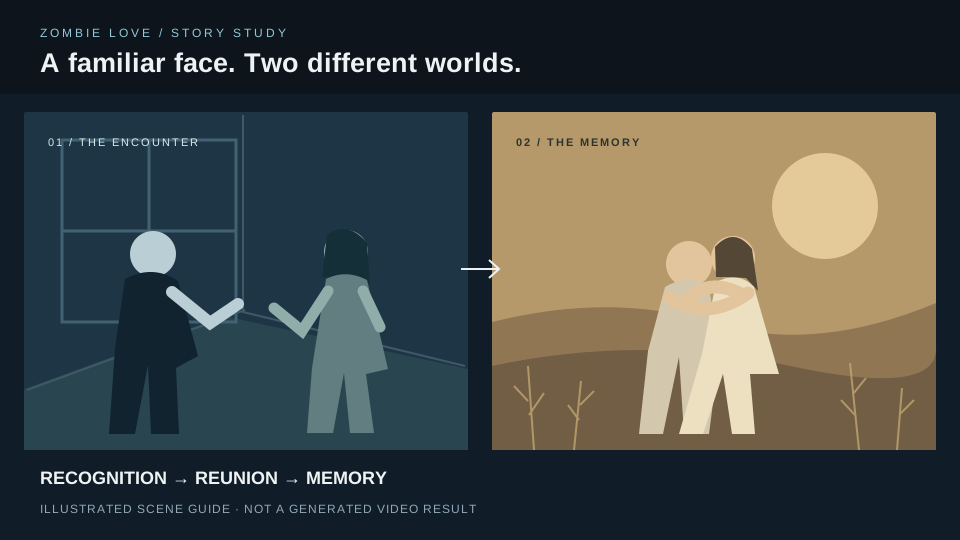
Story illustration · Recognition, reunion, memory.
Decide who stays human and who becomes the infected partner. Each photo has its own named slot.
Upload one clear photo for each character. A normal portrait is enough—no zombie makeup or acting needed.
Check both role labels, choose Standard or HD and review the credit cost before creating.
Add one clear portrait of the person who stays human and faces their infected partner.
Add one clear, unfiltered portrait of the person shown infected in the encounter and healthy in the memory.
One-time packs. No subscription.
$9.99
10 credits · one-time pack
$24.99
30 credits · one-time pack
$69.99
100 credits · one-time pack
Each video uses the credits shown above. One balance works across templates.
Choose Change photo in each named slot, then check the two thumbnails again.
Crop it into two separate portraits. If the faces overlap or one is obscured, choose another photo.
Use a JPG, PNG or WebP file up to 10 MB. If it still will not open, export a fresh copy and try again.
Choose a closer portrait with the whole head and some shoulder space visible. Avoid wide group shots.
You can choose a partner or a friend. The roles do not specify gender; pick two people who are comfortable with the story and the way their relationship is shown.
No. Use a normal, unfiltered portrait. The infected partner appears both infected and healthy at different points in the story.
No. Use the Survivor and Infected partner labels. The characters may move or appear in close-up, so screen position can change.
This template follows one reunion-and-memory story. It does not have a scene editor or a dialogue field.
Standard is 480p and HD is 720p. Both use the same characters and story; HD changes the resolution.
The current options show 10 credits for Standard and 30 for HD. Your selected quality and total credit cost appear above the create button.
Choose audio you have permission to use. If you add a track in a social app, check its usage rules for the kind of post you plan to share.
Uploaded photos are private and kept for up to 24 hours. Finished videos can be downloaded from My creations for up to 7 days, so save a copy you want to keep.
Understand the three story beats, choose your two characters and prepare the portraits for a Zombie Love video.
One photo. Your own street performance.